Skip to content
SideThread
Join early access

Your Time in Focus.

Track on your watch or in your lenses.Analyze your week, or year. Understand your day.

SideThread helps you see how you spend your time — across all the places you go,
all the things you do, and all the devices you use.

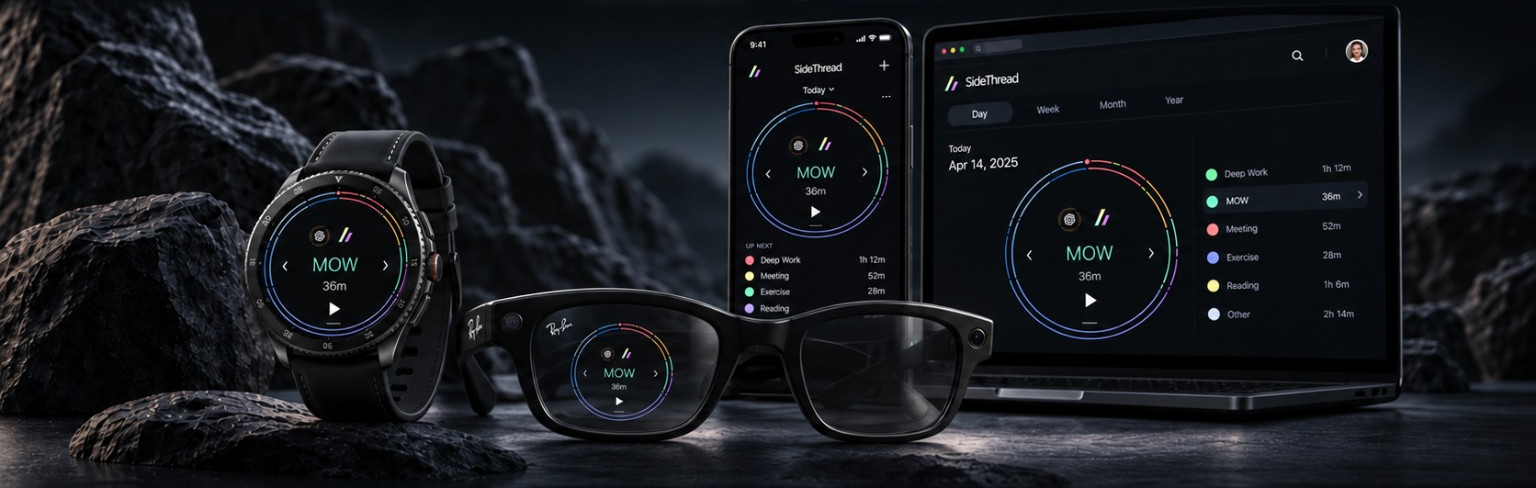
SideThread on a round watch at left, smart glasses in front, a slab phone behind them, and a laptop at right. The glasses show both thin time rings in only the wearer's right lens, on the left of this front-facing image; the other lens has no display.
Illustrative displays · Compatible hardware required and sold separatelyView larger (opens in a new tab)

ONE ACCOUNT. YOUR DISPLAYS.

Time tracking that fits around you.

Keep the big picture. See the details.

01 / PERSPECTIVE

Your plan.
Your real day.

The outer ring shows your tracked time. The inner ring shows the proportions your plan calls for by now. See how they compare, without your calendar starting or stopping a timer.

TrackedPlanned by now
WORK1h 24m
02 / DETAIL

One timer.
More detail.

Move from focused work to a meeting without losing the bigger picture. Subtimer totals stay within their parent timer.

WORK1h 24m
Focus 52mMeeting 32m

THE WHOLE. AND WHAT WENT INTO IT.

In reach.

Check your time and daily totals on your watch, at a glance. Tap the SideThread logo to open the radial menu.

Watch setup

In view.

Start and stop named timers right from your glasses. Swipe between your saved starting points to change the chart’s focus.

Glasses setup

In detail.

Browse previous days and view or edit your punches. Plan today or tomorrow, set timer colors, and save your focus starting points.

Android setup

A bigger picture.

Open SideThread on a larger screen to track, plan, and review your time with the same thin-ring view.

Browser setup

START WITH FREE EARLY ACCESS

One account. Your displays.

Every request reviewed personally. For adults aged 18 and over.

Join early access